Heat Pump
This tutorial demonstrates how to perform an exergy analysis of a heat pump using ExerPy. The analysis is carried out with:
Ebsilon
Aspen Plus
tespy
The flowsheet of the system is shown below.
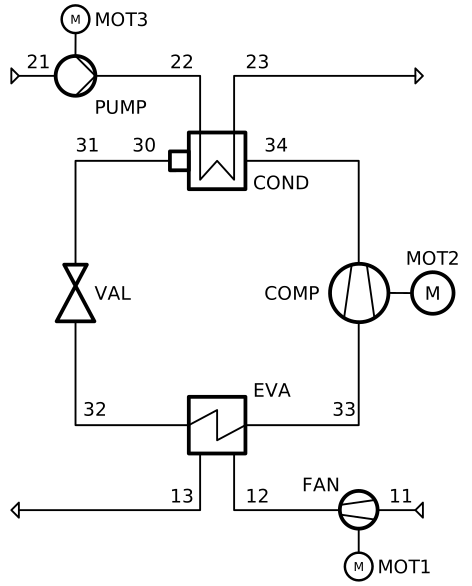
Figure: Flowsheet of the heat pump model

Figure: Flowsheet of the heat pump model
The import of the exerpy dependency is the same for all simulators:
Import Necessary Modules
from exerpy import ExergyAnalysis
Download the Ebsilon simulation model here:
hp.ebs
Initialize the Exergy Analysis
Create an instance of the ExergyAnalysis class using the from_ebsilon method.
Since this system operates at temperature under the ambient temperature, it is strongly
recommended to split the physical exergy into its mechanical and thermal parts
by setting the split_physical_exergy parameter to True.
model_path = 'hp.ebs'

ean = ExergyAnalysis.from_ebsilon(model_path, split_physical_exergy=True)
Define the exergy flows crossing the system boundaries
ExerPy requires you to specify the fuel (E_F), product
(E_P), and loss (E_L) exergy streams in your system.
These are defined using dictionaries with "inputs" and "outputs"
keys, containing lists of connection IDs from your Ebsilon model.
fuel = {
    "inputs": ['E1', 'E2', 'E3'],
    "outputs": []
}

product = {
    "inputs": ['23'],
    "outputs": ['21']
}

loss = {
    "inputs": ['13'],
    "outputs": ['11']
}
For this process, the exergetic fuel of the system (E_F) is the sum of the inlet power flows
(E1, E2, E3). The exergetic product of the system (E_P) consists of the
difference between the exergy of the hot water outlet (23) and the exergy of the cold water
inlet (21). Air is the heat source of the system. However, it enters the system at the ambient state
and is released at a lower temperature. Therefore, the difference between the exergy of the air outlet (13)
and the exergy of the air inlet (11) represents the exergy loss of the system (E_L).
Note
The dictionary labels must exactly match the connection labels defined in the Ebsilon simulation model. By default, Ebsilon assigns generic names to streams (e.g., “water”, “water_1”). It is strongly recommended to rename the stream labels in Ebsilon using consistent and meaningful labels.
For example: use “1”, “2”, “3” for material connections and “E1”, “E2”, “E3” for electrical connections, “H1”, “H2”, “H3” for heat connections, etc.
Full Example Code:
from exerpy import ExergyAnalysis

model_path = 'hp.ebs'

ean = ExergyAnalysis.from_ebsilon(model_path, chemExLib='Ahrendts', split_physical_exergy=False)

fuel = {
    "inputs": ['E1', 'E2', 'E3'],
    "outputs": []
}

product = {
    "inputs": ['23'],
    "outputs": ['21']
}

loss = {
    "inputs": ['13'],
    "outputs": ['11']
}

ean.analyse(E_F=fuel, E_P=product, E_L=loss)
ean.exergy_results()
For the tespy model we have prepared the code to run the simulation in the dropdown below. To learn how to set up tespy models and what things to be aware of when working with tespy, we kindly refer to the online documentation of tespy.
Code of the tespy model
from tespy.components import Compressor
from tespy.components import CycleCloser
from tespy.components import HeatExchanger
from tespy.components import Motor
from tespy.components import PowerBus
from tespy.components import PowerSource
from tespy.components import Pump
from tespy.components import Sink
from tespy.components import Source
from tespy.components import Valve
from tespy.connections import Connection
from tespy.connections import PowerConnection
from tespy.networks import Network

from exerpy import ExergyAnalysis

# Reference environment conditions
pamb = 101300
Tamb = 283.15

# ----------------------------------------------------------------------------------------------------------------------
# 1. Create TESPy network and components
# ----------------------------------------------------------------------------------------------------------------------
nw = Network()
nw.units.set_defaults(
    temperature="degC",
    pressure="bar",
    pressure_difference="bar",
    enthalpy="kJ / kg",
    mass_flow="kg / s",
    heat="kW",
    power="kW",
)

air_in = Source("air inlet")
air_out = Sink("air outlet")
fan = Compressor("FAN")

water_in = Source("water inlet")
water_out = Sink("water outlet")
pump = Pump("PUMP")

evaporator = HeatExchanger("EVA")
condenser = HeatExchanger("COND")
compressor = Compressor("COMP")
valve = Valve("VAL")
cc = CycleCloser("cc")

c11 = Connection(air_in, "out1", fan, "in1", label="11")
c12 = Connection(fan, "out1", evaporator, "in1", label="12")
c13 = Connection(evaporator, "out1", air_out, "in1", label="13")

c21 = Connection(water_in, "out1", pump, "in1", label="21")
c22 = Connection(pump, "out1", condenser, "in2", label="22")
c23 = Connection(condenser, "out2", water_out, "in1", label="23")

c30 = Connection(condenser, "out1", cc, "in1", label="30")
c31 = Connection(cc, "out1", valve, "in1", label="31")
c32 = Connection(valve, "out1", evaporator, "in2", label="32")
c33 = Connection(evaporator, "out2", compressor, "in1", label="33")
c34 = Connection(compressor, "out1", condenser, "in1", label="34")

nw.add_conns(c11, c12, c13)
nw.add_conns(c21, c22, c23)
nw.add_conns(c30, c31, c32, c33, c34)

c11.set_attr(fluid={"Ar": 0.0129, "CO2": 0.0005, "N2": 0.7552, "O2": 0.2314}, T=10, p=1.013)
c13.set_attr(T=8, p=1.013)

c21.set_attr(fluid={"water": 1}, T=70, p=5, m=10)
c23.set_attr(T=120, p=5)

c31.set_attr(T=75)
c32.set_attr(p=0.6, fluid={"R245FA": 1})
c34.set_attr(p=23)

compressor.set_attr(eta_s=0.8)
fan.set_attr(eta_s=0.85)
pump.set_attr(eta_s=0.8)
evaporator.set_attr(dp1=0.03, dp2=0.05)
condenser.set_attr(dp1=0.05, dp2=0.05)

evaporator.set_attr(ttd_u=5)

power_input = PowerSource("grid")
distribution = PowerBus("electricity distribution", num_in=1, num_out=3)
motor1 = Motor("MOT1")
motor2 = Motor("MOT2")
motor3 = Motor("MOT3")

e1 = PowerConnection(power_input, "power", distribution, "power_in1", label="e1")
e2 = PowerConnection(distribution, "power_out3", motor3, "power_in", label="E3")
e3 = PowerConnection(motor3, "power_out", pump, "power", label="e3")
e4 = PowerConnection(distribution, "power_out1", motor1, "power_in", label="E1")
e5 = PowerConnection(motor1, "power_out", fan, "power", label="e5")
e6 = PowerConnection(distribution, "power_out2", motor2, "power_in", label="E2")
e7 = PowerConnection(motor2, "power_out", compressor, "power", label="e7")

nw.add_conns(e1, e2, e3, e4, e5, e6, e7)

motor1.set_attr(eta=0.985)
motor2.set_attr(eta=0.985)
motor3.set_attr(eta=0.985)

nw.solve("design")

# Run final simulation with ttd_l in condenser set
condenser.set_attr(ttd_l=5)
c31.set_attr(T=None)
nw.solve("design")

nw.assert_convergence()

nw.print_results()
Initialize the Exergy Analysis
After setting up the model, we set up the ExergyAnalysis
instances using the from_tespy method. It takes the
converged tespy.Network object along with ambient state and
(optionally) the chemical exergy library as inputs.
Tip
TESPy can handle the splitting of physical exergy into its mechanical
and thermal shares, therefore split_phyiscal_exergy can
always be set to True when using tespy. In this instance it is
set to False because ASPEN cannot handle this, and we wanted to
cross validate the results of the examples for all three simulators.
# ----------------------------------------------------------------------------------------------------------------------
# 2. Exergy analysis
# ----------------------------------------------------------------------------------------------------------------------
ean = ExergyAnalysis.from_tespy(nw, Tamb, pamb, split_physical_exergy=False)
Define the exergy flows crossing the system boundaries
For this plant, the exergetic fuel of the system (E_F) is the
total input of electrical power through the three motors. The cold air
leaving the evaporator on the heat source side is considered a exergy
loss of the system (E_L), and the change of exergy from the
liquid water to steam is considered the exergy product (E_P).
fuel = {"inputs": ["e1"], "outputs": []}
product = {"inputs": ["23"], "outputs": ["21"]}
loss = {"inputs": ["13"], "outputs": ["11"]}
Download the Aspen simulation model here:
hp.bkp
Initialize the Exergy Analysis
Create an instance of the ExergyAnalysis class using the from_aspen method.
This system operates at temperature under the ambient temperature. Therefore it should be
good practise to split the physical exergy into its mechanical and thermal parts
by setting the split_physical_exergy parameter to True. However, at the moment,
it is not possible to split the physical exergy into its mechanical and thermal shares
when using Aspen Plus. Therefore, the split_physical_exergy parameter is not available
when using the from_aspen method.
Note
At the moment, it is not possible to split the physical exergy into its mechanical and thermal shares
when using Aspen Plus. Therefore, the split_physical_exergy parameter should be always set to False
when using the from_aspen method.
model_path = 'hp.bkp'

ean = ExergyAnalysis.from_aspen(model_path, chemExLib='Ahrendts', split_physical_exergy=False)
Define the exergy flows crossing the system boundaries
ExerPy requires you to specify the fuel (E_F), product
(E_P), and loss (E_L) exergy streams in your system.
These are defined using dictionaries with "inputs" and "outputs"
keys, containing lists of connection IDs from your Aspen model.
fuel = {
    "inputs": ['E1', 'E2', 'E3'],
    "outputs": []
}

product = {
    "inputs": ['23'],
    "outputs": ['21']
}

loss = {
    "inputs": ['13'],
    "outputs": ['11']
}
For this process, the exergetic fuel of the system (E_F) is the sum of the inlet power flows
(E1, E2, E3). The exergetic product of the system (E_P) consists of the
difference between the exergy of the hot water outlet (23) and the exergy of the cold water
inlet (21). Air is the heat source of the system. However, it enters the system at the ambient state
and is released at a lower temperature. Therefore, the difference between the exergy of the air outlet (13)
and the exergy of the air inlet (11) represents the exergy loss of the system (E_L).
Note
The dictionary labels must exactly match the connection labels defined in the Aspen simulation model. It is strongly recommended to rename the stream labels in Aspen using consistent and meaningful labels.
For example: use “1”, “2”, “3” for material connections and “E1”, “E2”, “E3” for electrical connections, “H1”, “H2”, “H3” for heat connections, etc.
Full Example Code:
from exerpy import ExergyAnalysis

model_path = 'heatpump.bkp'

ean = ExergyAnalysis.from_aspen(model_path, chemExLib='Ahrendts', split_physical_exergy=False)

fuel = {
    "inputs": ['E1', 'E2', 'E3'],
    "outputs": []
}

product = {
    "inputs": ['23'],
    "outputs": ['21']
}

loss = {
    "inputs": ['13'],
    "outputs": ['11']
}

ean.analyse(E_F=fuel, E_P=product, E_L=loss)
ean.exergy_results()
Running the exergy analysis and working with the results is now independant for all simulators.
Perform the Exergy Analysis
Run the analysis by invoking the analyse
method on the ExergyAnalysis instance, passing the defined fuel, product,
and loss exergy streams.
ean.analyse(E_F=fuel, E_P=product, E_L=loss)
Retrieve and Display Results
After the analysis is complete,
retrieve the results using the exergy_results method.
# Retrieve and display the results
df_components, df_material_connections, df_non_material_connections = ean.exergy_results()

# Print the components exergy results
print(df_components)

# Optionally, save the results to CSV files
df_components.to_csv('components_exergy_results.csv')
df_material_connections.to_csv('material_connections_exergy_results.csv')
df_non_material_connections.to_csv('non_material_connections_exergy_results.csv')