Heat Pump
See also
The method behind this example: Exergy Analysis.
This tutorial demonstrates how to perform an exergy analysis of a heat pump using ExerPy. The analysis is carried out with:
Ebsilon
Aspen Plus
tespy
The flowsheet of the system is shown below.
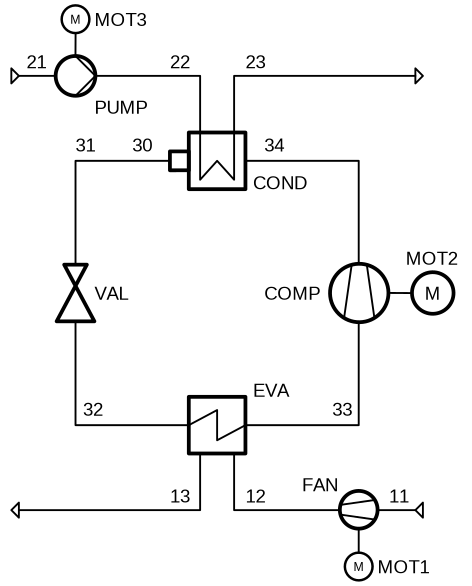
Figure: Flowsheet of the heat pump model

Figure: Flowsheet of the heat pump model
Importing exerpy is the same for all simulators:
Import Necessary Modules
from exerpy import ExergyAnalysis
Download the Ebsilon simulation model here:
hp.ebs
Initialize the Exergy Analysis
Create an instance of the ExergyAnalysis class using the from_ebsilon method.
Since this system operates at temperatures below the ambient temperature, it is strongly
recommended to split the physical exergy into its mechanical and thermal parts
by setting the split_physical_exergy parameter to True.
model_path = 'hp.ebs'

ean = ExergyAnalysis.from_ebsilon(model_path, split_physical_exergy=True)
Define the exergy flows crossing the system boundaries
ExerPy requires you to specify the fuel (E_F), product
(E_P), and loss (E_L) exergy streams in your system.
These are defined using dictionaries with "inputs" and "outputs"
keys, containing lists of connection IDs from your Ebsilon model.
fuel = {
    "inputs": ['E1', 'E2', 'E3'],
    "outputs": []
}

product = {
    "inputs": ['23'],
    "outputs": ['21']
}

loss = {
    "inputs": ['13'],
    "outputs": ['11']
}
For this process, the exergetic fuel of the system (E_F) is the sum of the inlet power flows
(E1, E2, E3). The exergetic product of the system (E_P) is the
difference between the exergy of the hot water outlet (23) and the exergy of the cold water
inlet (21). Air is the heat source of the system. However, it enters the system at the ambient state
and is released at a lower temperature. Therefore, the difference between the exergy of the air outlet (13)
and the exergy of the air inlet (11) represents the exergy loss of the system (E_L).
Note
The dictionary labels must exactly match the connection labels defined in the Ebsilon simulation model. By default, Ebsilon assigns generic names to streams (e.g., “water”, “water_1”). It is strongly recommended to give the streams consistent and meaningful labels in Ebsilon.
For example, use “1”, “2”, “3” for material connections, “E1”, “E2”, “E3” for electrical connections, and “H1”, “H2”, “H3” for heat connections.
Full code of this example
import logging
import os

logging.basicConfig(level=logging.WARNING, format="%(asctime)s - %(levelname)s - %(message)s")

from exerpy import ExergyAnalysis

# ----------------------------------------------------------------------------------------------------------------------
# 1. Import model from Ebsilon
# ----------------------------------------------------------------------------------------------------------------------
model_path = os.path.abspath(os.path.join(os.path.dirname(__file__), "hp.ebs"))

# ----------------------------------------------------------------------------------------------------------------------
# 2. Exergy analysis
# ----------------------------------------------------------------------------------------------------------------------
ean = ExergyAnalysis.from_ebsilon(model_path, split_physical_exergy=True)

fuel = {"inputs": ["E1", "E2", "E3"], "outputs": []}
product = {"inputs": ["23"], "outputs": ["21"]}
loss = {"inputs": ["13"], "outputs": ["11"]}

ean.analyse(E_F=fuel, E_P=product, E_L=loss)
df_component_results, _, _ = ean.exergy_results()
ean.export_to_json("examples/exergy_analysis/heatpump/hp_ebs.json")
df_component_results.to_csv("examples/exergy_analysis/heatpump/hp_components_ebsilon.csv")
For the tespy model, the code to run the simulation is provided in the dropdown below. To learn how to set up tespy models and what to be aware of when working with tespy, please refer to the online documentation of tespy.
Code of the tespy model
from tespy.components import Compressor
from tespy.components import CycleCloser
from tespy.components import HeatExchanger
from tespy.components import Motor
from tespy.components import PowerBus
from tespy.components import PowerSource
from tespy.components import Pump
from tespy.components import Sink
from tespy.components import Source
from tespy.components import Valve
from tespy.connections import Connection
from tespy.connections import PowerConnection
from tespy.networks import Network

from exerpy import ExergyAnalysis

# Reference environment conditions
pamb = 101300
Tamb = 283.15

# ----------------------------------------------------------------------------------------------------------------------
# 1. Create TESPy network and components
# ----------------------------------------------------------------------------------------------------------------------
nw = Network()
nw.units.set_defaults(
    temperature="degC",
    pressure="bar",
    pressure_difference="bar",
    enthalpy="kJ / kg",
    mass_flow="kg / s",
    heat="kW",
    power="kW",
)

air_in = Source("air inlet")
air_out = Sink("air outlet")
fan = Compressor("FAN")

water_in = Source("water inlet")
water_out = Sink("water outlet")
pump = Pump("PUMP")

evaporator = HeatExchanger("EVA")
condenser = HeatExchanger("COND")
compressor = Compressor("COMP")
valve = Valve("VAL")
cc = CycleCloser("cc")

c11 = Connection(air_in, "out1", fan, "in1", label="11")
c12 = Connection(fan, "out1", evaporator, "in1", label="12")
c13 = Connection(evaporator, "out1", air_out, "in1", label="13")

c21 = Connection(water_in, "out1", pump, "in1", label="21")
c22 = Connection(pump, "out1", condenser, "in2", label="22")
c23 = Connection(condenser, "out2", water_out, "in1", label="23")

c30 = Connection(condenser, "out1", cc, "in1", label="30")
c31 = Connection(cc, "out1", valve, "in1", label="31")
c32 = Connection(valve, "out1", evaporator, "in2", label="32")
c33 = Connection(evaporator, "out2", compressor, "in1", label="33")
c34 = Connection(compressor, "out1", condenser, "in1", label="34")

nw.add_conns(c11, c12, c13)
nw.add_conns(c21, c22, c23)
nw.add_conns(c30, c31, c32, c33, c34)

c11.set_attr(fluid={"Ar": 0.0129, "CO2": 0.0005, "N2": 0.7552, "O2": 0.2314}, T=10, p=1.013)
c13.set_attr(T=8, p=1.013)

c21.set_attr(fluid={"water": 1}, T=70, p=5, m=10)
c23.set_attr(T=120, p=5)

c32.set_attr(p=0.6, fluid={"R245FA": 1})
c34.set_attr(p=23)

compressor.set_attr(eta_s=0.8)
fan.set_attr(eta_s=0.85)
pump.set_attr(eta_s=0.8)
evaporator.set_attr(dp1=0.03, dp2=0.05)
condenser.set_attr(dp1=0.05, dp2=0.05, ttd_l=5)

evaporator.set_attr(ttd_u=5)

power_input = PowerSource("grid")
distribution = PowerBus("electricity distribution", num_in=1, num_out=3)
motor1 = Motor("MOT1")
motor2 = Motor("MOT2")
motor3 = Motor("MOT3")

e1 = PowerConnection(power_input, "power", distribution, "power_in1", label="e1")
e2 = PowerConnection(distribution, "power_out3", motor3, "power_in", label="E3")
e3 = PowerConnection(motor3, "power_out", pump, "power", label="e3")
e4 = PowerConnection(distribution, "power_out1", motor1, "power_in", label="E1")
e5 = PowerConnection(motor1, "power_out", fan, "power", label="e5")
e6 = PowerConnection(distribution, "power_out2", motor2, "power_in", label="E2")
e7 = PowerConnection(motor2, "power_out", compressor, "power", label="e7")

nw.add_conns(e1, e2, e3, e4, e5, e6, e7)

motor1.set_attr(eta=0.985)
motor2.set_attr(eta=0.985)
motor3.set_attr(eta=0.985)

nw.solve("design")

nw.assert_convergence()

nw.print_results()
Initialize the Exergy Analysis
After setting up the model, we create the ExergyAnalysis
instance using the from_tespy method. It takes the
converged tespy.Network object along with the ambient state and
(optionally) the chemical exergy library as inputs.
Tip
TESPy provides the thermal and the mechanical shares of the physical exergy, so
split_physical_exergy can be set to True, as in this example.
# ----------------------------------------------------------------------------------------------------------------------
# 2. Exergy analysis
# ----------------------------------------------------------------------------------------------------------------------
ean = ExergyAnalysis.from_tespy(nw, Tamb, pamb, split_physical_exergy=True)
Define the exergy flows crossing the system boundaries
For this plant, the exergetic fuel of the system (E_F) is the
total electrical power input to the three motors. The cold air
leaving the evaporator on the heat source side is considered an exergy
loss of the system (E_L), and the change in exergy from the
liquid water to the steam is considered the exergy product (E_P).
fuel = {"inputs": ["e1"], "outputs": []}
product = {"inputs": ["23"], "outputs": ["21"]}
loss = {"inputs": ["13"], "outputs": ["11"]}
Full code of this example
from tespy.components import Compressor
from tespy.components import CycleCloser
from tespy.components import HeatExchanger
from tespy.components import Motor
from tespy.components import PowerBus
from tespy.components import PowerSource
from tespy.components import Pump
from tespy.components import Sink
from tespy.components import Source
from tespy.components import Valve
from tespy.connections import Connection
from tespy.connections import PowerConnection
from tespy.networks import Network

from exerpy import ExergyAnalysis

# Reference environment conditions
pamb = 101300
Tamb = 283.15

# ----------------------------------------------------------------------------------------------------------------------
# 1. Create TESPy network and components
# ----------------------------------------------------------------------------------------------------------------------
nw = Network()
nw.units.set_defaults(
    temperature="degC",
    pressure="bar",
    pressure_difference="bar",
    enthalpy="kJ / kg",
    mass_flow="kg / s",
    heat="kW",
    power="kW",
)

air_in = Source("air inlet")
air_out = Sink("air outlet")
fan = Compressor("FAN")

water_in = Source("water inlet")
water_out = Sink("water outlet")
pump = Pump("PUMP")

evaporator = HeatExchanger("EVA")
condenser = HeatExchanger("COND")
compressor = Compressor("COMP")
valve = Valve("VAL")
cc = CycleCloser("cc")

c11 = Connection(air_in, "out1", fan, "in1", label="11")
c12 = Connection(fan, "out1", evaporator, "in1", label="12")
c13 = Connection(evaporator, "out1", air_out, "in1", label="13")

c21 = Connection(water_in, "out1", pump, "in1", label="21")
c22 = Connection(pump, "out1", condenser, "in2", label="22")
c23 = Connection(condenser, "out2", water_out, "in1", label="23")

c30 = Connection(condenser, "out1", cc, "in1", label="30")
c31 = Connection(cc, "out1", valve, "in1", label="31")
c32 = Connection(valve, "out1", evaporator, "in2", label="32")
c33 = Connection(evaporator, "out2", compressor, "in1", label="33")
c34 = Connection(compressor, "out1", condenser, "in1", label="34")

nw.add_conns(c11, c12, c13)
nw.add_conns(c21, c22, c23)
nw.add_conns(c30, c31, c32, c33, c34)

c11.set_attr(fluid={"Ar": 0.0129, "CO2": 0.0005, "N2": 0.7552, "O2": 0.2314}, T=10, p=1.013)
c13.set_attr(T=8, p=1.013)

c21.set_attr(fluid={"water": 1}, T=70, p=5, m=10)
c23.set_attr(T=120, p=5)

c32.set_attr(p=0.6, fluid={"R245FA": 1})
c34.set_attr(p=23)

compressor.set_attr(eta_s=0.8)
fan.set_attr(eta_s=0.85)
pump.set_attr(eta_s=0.8)
evaporator.set_attr(dp1=0.03, dp2=0.05)
condenser.set_attr(dp1=0.05, dp2=0.05, ttd_l=5)

evaporator.set_attr(ttd_u=5)

power_input = PowerSource("grid")
distribution = PowerBus("electricity distribution", num_in=1, num_out=3)
motor1 = Motor("MOT1")
motor2 = Motor("MOT2")
motor3 = Motor("MOT3")

e1 = PowerConnection(power_input, "power", distribution, "power_in1", label="e1")
e2 = PowerConnection(distribution, "power_out3", motor3, "power_in", label="E3")
e3 = PowerConnection(motor3, "power_out", pump, "power", label="e3")
e4 = PowerConnection(distribution, "power_out1", motor1, "power_in", label="E1")
e5 = PowerConnection(motor1, "power_out", fan, "power", label="e5")
e6 = PowerConnection(distribution, "power_out2", motor2, "power_in", label="E2")
e7 = PowerConnection(motor2, "power_out", compressor, "power", label="e7")

nw.add_conns(e1, e2, e3, e4, e5, e6, e7)

motor1.set_attr(eta=0.985)
motor2.set_attr(eta=0.985)
motor3.set_attr(eta=0.985)

nw.solve("design")

nw.assert_convergence()

nw.print_results()

# [tespy_model_section_end]
# ----------------------------------------------------------------------------------------------------------------------
# 2. Exergy analysis
# ----------------------------------------------------------------------------------------------------------------------
ean = ExergyAnalysis.from_tespy(nw, Tamb, pamb, split_physical_exergy=True)
# [exergy_analysis_setup]
fuel = {"inputs": ["e1"], "outputs": []}
product = {"inputs": ["23"], "outputs": ["21"]}
loss = {"inputs": ["13"], "outputs": ["11"]}
# [exergy_analysis_flows]
ean.analyse(E_F=fuel, E_P=product, E_L=loss)
df_component_results, _, _ = ean.exergy_results()
ean.export_to_json("examples/exergy_analysis/heatpump/hp_tespy.json")
df_component_results.to_csv("examples/exergy_analysis/heatpump/hp_components_tespy.csv")
Download the Aspen simulation model here:
hp.bkp
Initialize the Exergy Analysis
Create an instance of the ExergyAnalysis class using the from_aspen method.
Since this system operates at temperatures below the ambient temperature, it is strongly
recommended to split the physical exergy into its mechanical and thermal parts
by setting the split_physical_exergy parameter to True.
Note
Aspen Plus reports the physical exergy of a stream, but not its thermal and mechanical shares. For the split, ExerPy adds a property analysis for each stream to the model in memory and runs the simulation once. The analysis evaluates the stream at the ambient temperature and its own pressure, with the property method of the stream. The model file stays unchanged.
model_path = 'hp.bkp'

ean = ExergyAnalysis.from_aspen(model_path, split_physical_exergy=True)
Define the exergy flows crossing the system boundaries
ExerPy requires you to specify the fuel (E_F), product
(E_P), and loss (E_L) exergy streams in your system.
These are defined using dictionaries with "inputs" and "outputs"
keys, containing lists of connection IDs from your Aspen model.
fuel = {
    "inputs": ['E1', 'E2', 'E3'],
    "outputs": []
}

product = {
    "inputs": ['23'],
    "outputs": ['21']
}

loss = {
    "inputs": ['13'],
    "outputs": ['11']
}
For this process, the exergetic fuel of the system (E_F) is the sum of the inlet power flows
(E1, E2, E3). The exergetic product of the system (E_P) is the
difference between the exergy of the hot water outlet (23) and the exergy of the cold water
inlet (21). Air is the heat source of the system. However, it enters the system at the ambient state
and is released at a lower temperature. Therefore, the difference between the exergy of the air outlet (13)
and the exergy of the air inlet (11) represents the exergy loss of the system (E_L).
Note
The dictionary labels must exactly match the connection labels defined in the Aspen simulation model. It is strongly recommended to give the streams consistent and meaningful labels in Aspen.
For example, use “1”, “2”, “3” for material connections, “E1”, “E2”, “E3” for electrical connections, and “H1”, “H2”, “H3” for heat connections.
Full code of this example
import logging
import os

logging.basicConfig(level=logging.WARNING, format="%(asctime)s - %(levelname)s - %(message)s")

from exerpy import ExergyAnalysis

# ----------------------------------------------------------------------------------------------------------------------
# 1. Import model from Aspen
# ----------------------------------------------------------------------------------------------------------------------
model_path = os.path.abspath(os.path.join(os.path.dirname(__file__), "hp.bkp"))

# ----------------------------------------------------------------------------------------------------------------------
# 2. Exergy analysis
# ----------------------------------------------------------------------------------------------------------------------
ean = ExergyAnalysis.from_aspen(model_path, split_physical_exergy=True)

fuel = {"inputs": ["E1", "E2", "E3"], "outputs": []}
product = {"inputs": ["23"], "outputs": ["21"]}
loss = {"inputs": ["13"], "outputs": ["11"]}

ean.analyse(E_F=fuel, E_P=product, E_L=loss)
df_component_results, _, _ = ean.exergy_results()
ean.export_to_json("examples/exergy_analysis/heatpump/hp_aspen.json")
df_component_results.to_csv("examples/exergy_analysis/heatpump/hp_components_aspen.csv")
From here on, running the exergy analysis and working with the results is independent of the simulator.
Perform the Exergy Analysis
Run the analysis by invoking the analyse
method on the ExergyAnalysis instance, passing the defined fuel, product,
and loss exergy streams.
ean.analyse(E_F=fuel, E_P=product, E_L=loss)
Retrieve and Display Results
After the analysis is complete,
retrieve the results using the exergy_results method.
# Retrieve and display the results
df_components, df_material_connections, df_non_material_connections = ean.exergy_results()

# Print the components exergy results
print(df_components)

# Optionally, save the results to CSV files
df_components.to_csv('components_exergy_results.csv')
df_material_connections.to_csv('material_connections_exergy_results.csv')
df_non_material_connections.to_csv('non_material_connections_exergy_results.csv')